
Table of Contents
🛡️ TrustBeacon WordPress Email Delivery Auditor
Find WordPress Email Delivery Problems in Minutes
Identify public DNS and email-authentication problems that can cause WordPress messages to fail, be rejected, or land in spam. Reliable WordPress email delivery depends on correctly configured DNS and authentication records. TrustBeacon checks MX, SPF, DKIM, DMARC, and supporting domain-trust signals, then explains what needs attention. Cloudflare explains how SPF, DKIM and DMARC work together to authenticate email and reduce domain spoofing.
TrustBeacon Auditor WordPress Plugin
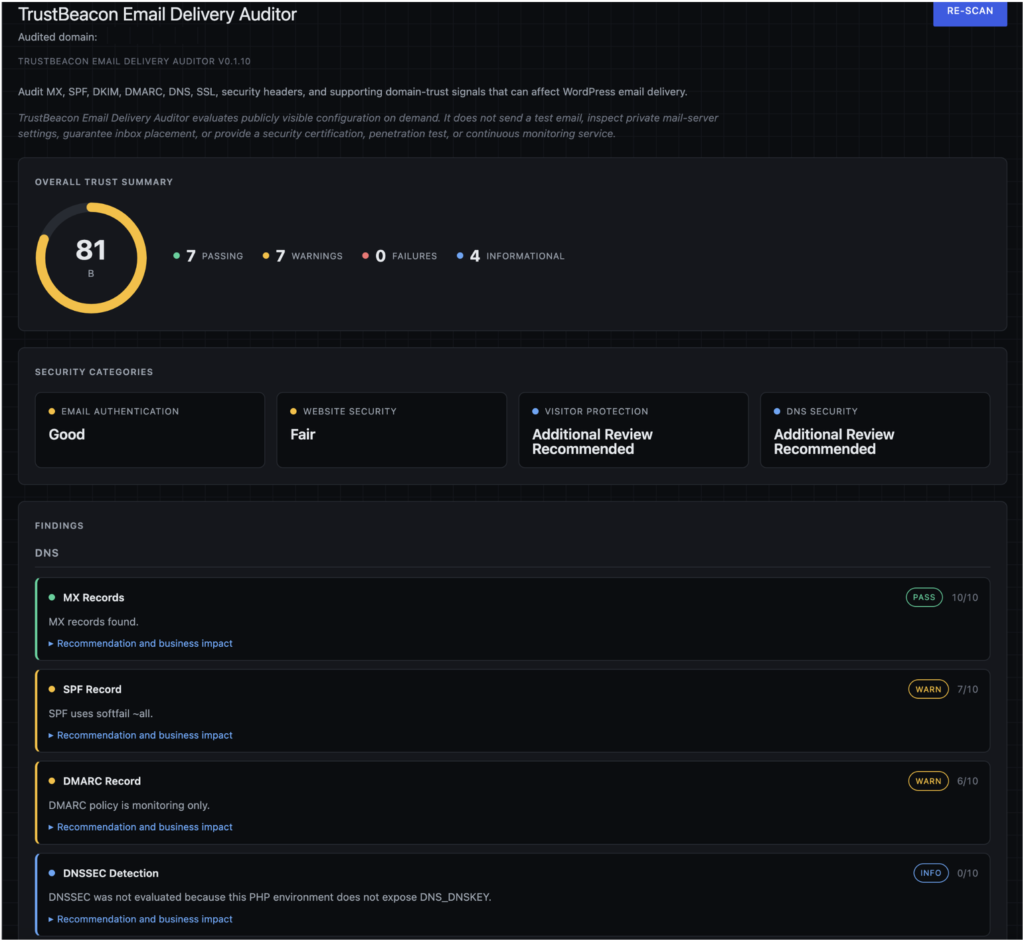
TrustBeacon Email Delivery Auditor helps WordPress administrators identify publicly visible configuration problems that can affect email transmission, authentication, and delivery. The audit highlights WordPress email delivery settings that may require attention.
The plugin examines MX, SPF, DKIM, DMARC, SSL, DNS, and related domain-trust signals. Each finding includes a plain-English explanation, a recommended action, and the potential business impact. Improving your WordPress email delivery may require changes through your DNS provider or email service.
Features
WordPress Email Delivery and Authentication
- MX record analysis
- SPF configuration and enforcement
- Common DKIM selector detection
- DMARC policy and enforcement analysis
- Plain-English recommendations
- Business-impact explanations
Supporting domain and website trust
- SSL certificate verification
- HTTP security-header analysis
- CAA record analysis
- DNSSEC detection when supported
- Cloudflare detection
- Public security-plugin indicators
- No third-party commercial API dependencies
SRV records and email services
SRV records help applications locate services associated with a domain. Email providers may use them for services such as mail-client configuration, calendaring, messaging, or Microsoft 365 connectivity. Although TrustBeacon does not currently audit SRV records, incorrectly configured service records can disrupt related email features.
How the WordPress Email Delivery Auditor Works
TrustBeacon Auditor allows administrators to enter a domain name and perform a series of non-invasive audits against publicly available information.
The plugin retrieves publicly available website data to help identify areas that may improve website trustworthiness and security posture with respect to WordPress email delivery. Run TrustBeacon whenever you need a fresh review of your WordPress email delivery configuration.
WARNING: Before changing email DNS records: Save the existing values and obtain the required records from each service that legitimately sends or receives email for your domain. Incorrect SPF, DKIM, DMARC, or MX changes can disrupt email delivery.
Why is my WordPress email going to spam?
WordPress email delivery may reach spam when the sending domain lacks properly configured SPF, DKIM, or DMARC authentication. Inbox placement can also be affected by the sending server’s reputation, message content, mailing volume, recipient engagement, and whether the From address aligns with the authenticated domain.
Why are WordPress emails not being delivered?
WordPress email delivery messages may fail because the hosting server cannot send mail, the recipient rejects the sending server, DNS records are incomplete, or email authentication fails. A successful WordPress form submission only confirms that WordPress processed the form; it does not prove that the resulting message reached an inbox.
What do SPF, DKIM, and DMARC do?
SPF identifies servers authorized to send email for a domain. DKIM adds a verifiable signature to outgoing messages. DMARC evaluates authentication and domain alignment, then tells receiving systems whether failed messages should be monitored, quarantined, or rejected. Together, they help reduce spoofing and improve domain credibility.
Does TrustBeacon send a WordPress test email?
No. TrustBeacon evaluates publicly visible DNS, email-authentication, SSL, and domain-trust configuration. It does not send a message through the WordPress mail system, inspect private mail-server settings, or guarantee delivery to a particular recipient or inbox provider.
Can TrustBeacon repair WordPress email-delivery settings?
TrustBeacon Email Delivery and Auditor is read-only. It identifies conditions that may require attention and provides plain-English recommendations and business-impact explanations. It does not automatically change DNS records, hosting settings, WordPress mail configuration, or settings maintained by an external email provider.
Does a passing TrustBeacon audit guarantee email delivery?
No. A favorable audit means the publicly visible signals examined by TrustBeacon appear properly configured. Actual delivery can still be affected by sending reputation, blocklists, message content, rate limits, recipient filtering, SMTP configuration, and other private systems that TrustBeacon cannot inspect.
How do I correct an SPF warning?
First, identify every legitimate service that sends email using your domain. This may include your hosting account, Google Workspace, Microsoft 365, a WordPress SMTP service, newsletter software, contact forms, or a transactional-email provider.
Check whether the domain already has an SPF TXT record. A domain should have one consolidated SPF record, not several separate SPF records. Add the sending mechanisms required by each legitimate provider to the existing record.
Do not copy another website’s SPF record. Use the exact include values supplied by your email providers. After confirming that every legitimate sender is represented, test the revised record before considering stronger enforcement such as -all.
Should I change SPF from ~all to -all?
~all applies a soft failure to unauthorized senders, while -all applies a hard failure. Stronger enforcement can improve protection against domain spoofing, but it can also reject legitimate messages if a valid sending service was omitted.
Before changing to -all, inventory all legitimate senders, verify that the SPF record includes them, and test mail from WordPress, business email, newsletters, forms, and other services.
How do I configure DKIM?
DKIM must normally be enabled through the service that sends your email. The provider supplies a selector and one or more DNS records, usually TXT or CNAME records.
Add the supplied record through the domain’s DNS provider. The record name commonly contains the selector followed by ._domainkey, but the exact selector and value must come from the sending provider. After DNS propagates, return to the email provider and complete its verification process.
How do I configure DMARC?
DMARC is published as a TXT record for _dmarc.yourdomain.com. Before enforcing quarantine or rejection, confirm that legitimate mail passes SPF or DKIM and aligns with the visible From domain.
Many administrators begin with a monitoring policy such as p=none and review DMARC reports. After legitimate senders have been identified and corrected, enforcement can be increased gradually to p=quarantine and eventually p=reject.
Where do I add SPF, DKIM and DMARC records?
These records are added through the service that controls your authoritative DNS. That may be Cloudflare, Hostinger, GoDaddy, Namecheap, your hosting control panel, or another DNS provider.
They are not normally entered inside WordPress. If you are unsure which company controls DNS, check the domain’s authoritative nameservers or ask the hosting provider.
Should I change my MX records?
Do not change MX records merely because another email-related check produced a warning. MX records control where incoming email is delivered.
Change them only when migrating email providers or when the current mail provider confirms that they are incorrect. Using the wrong MX records can stop the domain from receiving email.
Can TrustBeacon make these DNS changes automatically?
No. TrustBeacon is read-only. It identifies publicly visible configuration conditions and explains what should be reviewed. DNS changes must be made through the appropriate DNS or email provider.
This prevents the plugin from making a generic change that could interrupt legitimate email service.
External Service Disclosure
TrustBeacon Auditor performs remote HTTPS requests only to websites selected by the site administrator.
Data transmitted:
- Domain name being audited
- Standard HTTP request headers
- Plugin User-Agent identification string
No personal visitor information is collected, stored, or transmitted.
TrustBeacon Auditor does not utilize any third-party commercial APIs.
Privacy Policy
Terms of Service
Author
Jason Michael Canon
Canon Publishing, LLC